
Ini juga baik untuk laptop or computer yang x de CD/DVD - ROM drive..
U should have:
USB Flash Drive (minimum 4GB)
windows 7 or vista
Step
------
1 plug the usb pendrive and back up data yang ada pada pendrive,
2 open commad prompt or ( Start button + R) or open RUN and type "cmd"
3 next,
Type "DISKPART" and enter.
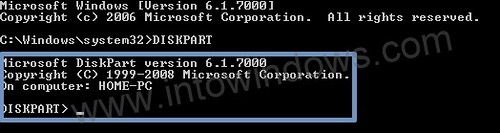 3.1 see which one is your disk that want to format by type "list disk" and it will appear it.
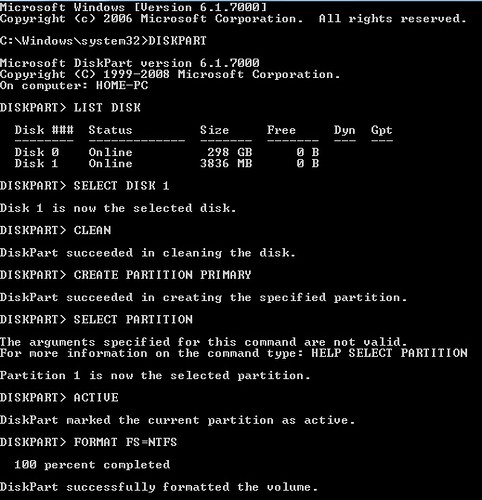
4 pilih la Disk yang mana korang nak format(pendrive yang diguna untuk format)
Type "Select Disk 1" jika (Disk 1 itu adalah pendrive yang digunakan untuk format)
5 follow and type sampai ke bawah:
"CLEAN"
"CREATE PARTITION PRIMARY"
"SELECT PARTITION 1"
"ACTIVE"
"FORMAT FS=NTFS"
(Format process may take few seconds)
"ASSIGN"
"EXIT"
Step Seterusnya:
-----------------
1. Command Prompt juga ( Start button + R) or open RUN and type "cmd"
2. Type "xcopy x:\*.* /s /e /f y:\"
x=DVD disk atau image of windows 7 or vista
y=pendrive yang digunakan untuk format
3. Tunggu sampai habis copy complete.
Then success....
view:

Kalau x faham jugak bole pergi ke link nie:
Step 1: clean and make boot
Step 2: copy data from DVD windows 7 or vista
Read more...


