Salam semua,
Alhamdulillah, saya doakan kesihatan kita diperbaikkan lagi dan dirahmati oleh Allah S.W.T. .
Dengan ini, saya ingin membuat pemberitahuan, servis yang saya offer tersebut terpaksa ditanggungkan seketika kerana saya sedang berada diluar kawasan dan sedang mengikuti program ijazah saya.
Alhamdulillah juga, ramai yang menghubungi saya untuk mendapatkan servis yang telah tentera di blog/web saya ini tetapi ramai juga gagal untuk mendapatkannya. Namun bergitu, saya dapat membantu anda semua dengan menasihati cara-cara atau prosedure yang baik agar anda dapat melakukannya sendiri atau cadangan kedai-kedai yang bagus akan saya berikan.
Semoga Allah dapat membantu anda sekalian bagi mengharungi dang mencapai kejayaan pada masa yang akan datang. Saya, Owner website ini, ingin mengucapkan selamat hari raya aidiladha dan selamat menunaikan ibadah haji dan korban bagi yang melakukannya !!! Happy Holidays guys!!
Read more...
Showing posts with label LAPTOP/DESKTOP. Show all posts
9/18/2015
11/20/2012
Change Windows 7 Key and Activate with new Windows 7 key
Hi, here again we discuss about the computer that need to change a new key product.
In this section, we scope it on the windows 7 only.
Sometimes, this need to do when:
Lets do it together:
1. Firstly, go to Start Menu and search "cmd", this will show command prompt result at the top as shown below:
2. Right Click on this cmd.exe or cmd icon and click Run As Administrator:
3. Type the following command:
slmgr.vbs /upk
this is for clear the previous key product.
after that
type : slmgr.vbs /ipk
this is update ur new product key.
example:
4. If you the above step correctly with a valid License Key for Windows 7, you will see a success message like the one below:
5. Now you need to activate Windows online. For this Go to Control Panel > System
On this screen you will find the link to activate Windows. Click on the link which says
“Activate Windows Now”
6. You will see a Windows Activation Window as seen below, select the Retype Product Key option:
7. Type the Windows key again in this window and it will start an online validation if you are connected to Internet.
8. Laslty, You will get a success message on activation on Windows.
Source :
So, if u need ask something that u dont understand, commend me here!
Read more...
In this section, we scope it on the windows 7 only.
Sometimes, this need to do when:
- You are updating from Windows 7 public beta to a licensed version of Windows
- You were having a copy of Windows 7 which was not genuine but you have now purchased a license and want to update the Windows 7 key
- You have any other need because of which you want to change Windows 7 key
Lets do it together:
1. Firstly, go to Start Menu and search "cmd", this will show command prompt result at the top as shown below:
2. Right Click on this cmd.exe or cmd icon and click Run As Administrator:
slmgr.vbs /upk
this is for clear the previous key product.
after that
type : slmgr.vbs /ipk
this is update ur new product key.
example:
4. If you the above step correctly with a valid License Key for Windows 7, you will see a success message like the one below:
5. Now you need to activate Windows online. For this Go to Control Panel > System
On this screen you will find the link to activate Windows. Click on the link which says
“Activate Windows Now”
6. You will see a Windows Activation Window as seen below, select the Retype Product Key option:
7. Type the Windows key again in this window and it will start an online validation if you are connected to Internet.
8. Laslty, You will get a success message on activation on Windows.
Source :
- hsolved-change-windows-7-key-and-activate-windows-7/
- How to Change windows 7 Product key
- http://tfy2012.blogspot.com/2012/06/how-to-change-windows-7-product-key.html
So, if u need ask something that u dont understand, commend me here!
Read more...
7/16/2012
How to know your game could play on your computer or not?
Everyone want to play game on their personal computer, but can the computer handle or specified the game on to the computer? So, I were like to share with viewer about this cool website.
Click link below;
Can your computer run that game?
This website was created to help us knowing the game requirement that will run on a computer. Suppose we as gamer like to know whether the game is either support or not. In this website, you will have to fill the option such as (1) Search a product by typing its name or select from the dropdown. (2) Click "Can you run it?".
So, this is easy. You just find your games and click the button (2). The result will show the game is suitable or not and the page also will recommend the requirement that need to play game on the computer.
First : You need to choose the game,
Second : Click the button after choosing,
Third : the website will analyze within few second,
Hope you will try it. =)
Read more...
2/02/2012
Using android phone through the computer for webcam
Those like to use their phone for making phone as medium for webcam by connection between phone and computer.
So, firstly u must have Android phone or tab and also computer, the computer should have Skype or Yahoo Messenger , if u don't have this, well, how u gonna turn on the webcam ,right?
Here is the steps;
Installation:
1. Install USB Webcam from Android Market or u can download from here. Turn on USB debugging (Settings->Application->Development->USB Debugging).
2. Download and Install the PC Host application below for Windows, by running the setup program. Download here too.
3. Make sure that the Phone USB driver is installed correctly. Follow the instructions by Google, or if you are experienced, in the device manager, install a driver for “ADB Interface” or similar. When prompted for the driver location, browse to the USB Webcam program directory. Also can Download here. If it installed correctly, under System Properties->Device Manager->Android Phone you should see Android Composite ADB Interface.
Next is how is work after step at above followed:
1. Plug your phone in via USB, and run the start menu program “USB Webcam”. Start USB Webcam on your phone.
2. Start Skype, for example. You should have a new webcam to choose in the settings pages. While the phone app is running, you should see a video feed. While the phone app is closed, a pink screen should show.
Resources :
*Placaware(Some random DIY computer projects)
*How to Use Your Droid as a Webcam
Ask me if u not much understand about it!
Read more...
View or Check who are stealing my Internet??
People nowadays are very professional with the new technology things such as Internet, Games, electronic devices and hack & crack something that important from the victims that innocent.
So, talk about the hack and crack, we as user that have Internet that provide from the services that we pay every month and those people that just hack or steal our connection with no ask our permission are kindly wrong and will stand for the justice.
So, here I like to show something or tool that can be use to check whether there a parasite or other user that we not define in modem.
Firstly, Download this .
next , open the zip file and Install it.
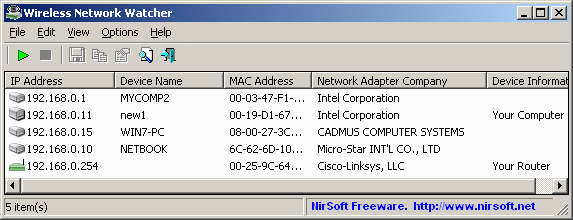
next, will show this:

For every computer or device that is connected to your network, the following information is displayed: IP address, MAC address, the company that manufactured the network card, and optionally the computer name.
You can also export the connected devices list into html/xml/csv/text file, or copy the list to the clipboard and then paste into Excel or other spreadsheet application.
Resource from:
*Wireless Network Watcher
*Netcut
Read more...
So, talk about the hack and crack, we as user that have Internet that provide from the services that we pay every month and those people that just hack or steal our connection with no ask our permission are kindly wrong and will stand for the justice.
So, here I like to show something or tool that can be use to check whether there a parasite or other user that we not define in modem.
Firstly, Download this .
next , open the zip file and Install it.
next, will show this:
Description
Wireless Network Watcher is a small utility that scans your wireless network and displays the list of all computers and devices that are currently connected to your network.For every computer or device that is connected to your network, the following information is displayed: IP address, MAC address, the company that manufactured the network card, and optionally the computer name.
You can also export the connected devices list into html/xml/csv/text file, or copy the list to the clipboard and then paste into Excel or other spreadsheet application.
System Requirements And Limitations
- This utility works on Windows 2000, Windows XP, Windows Server 2003/2008, Windows Vista, and Windows 7.
- This utility can only scan a wireless network that you're currently connected to. It cannot scan other wireless networks.
- In rare cases, it's possible that Wireless Network Watcher won't detect the correct wireless network adapter, and then you should go to 'Advanced Options' window (F9), and manually choose the correct network adapter.
- although this utility is officially designed for wireless networks, you can also use it to scan a small wired network.
Resource from:
*Wireless Network Watcher
*Netcut
Read more...
12/04/2010
Format windows 7 or vista using pendrive
Apa yang best menggunakan cara ini adalah, dapat format dengan lebih laju dalam masa 15minit nya,,
Ini juga baik untuk laptop or computer yang x de CD/DVD - ROM drive..
U should have:
USB Flash Drive (minimum 4GB)
windows 7 or vista
Step
------
1 plug the usb pendrive and back up data yang ada pada pendrive,
2 open commad prompt or ( Start button + R) or open RUN and type "cmd"
3 next,
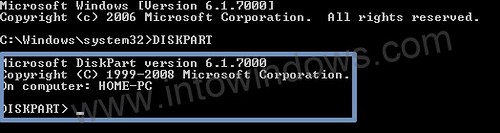
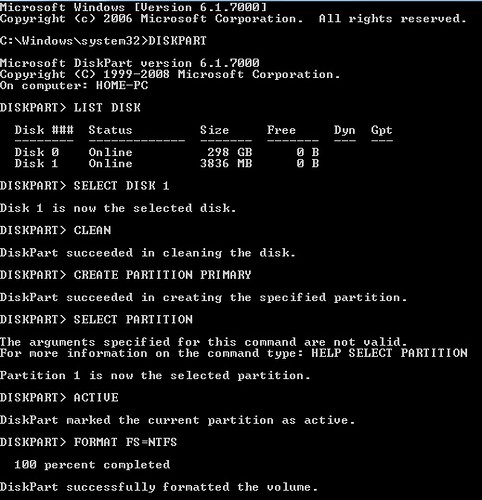
Type "DISKPART" and enter.
3.1 see which one is your disk that want to format by type "list disk" and it will appear it.
4 pilih la Disk yang mana korang nak format(pendrive yang diguna untuk format)
Type "Select Disk 1" jika (Disk 1 itu adalah pendrive yang digunakan untuk format)
5 follow and type sampai ke bawah:
"CLEAN"
"CREATE PARTITION PRIMARY"
"SELECT PARTITION 1"
"ACTIVE"
"FORMAT FS=NTFS"
(Format process may take few seconds)
"ASSIGN"
"EXIT"

Step Seterusnya:
-----------------
1. Command Prompt juga ( Start button + R) or open RUN and type "cmd"
2. Type "xcopy x:\*.* /s /e /f y:\"
x=DVD disk atau image of windows 7 or vista
y=pendrive yang digunakan untuk format
3. Tunggu sampai habis copy complete.
Then success....
view:

Kalau x faham jugak bole pergi ke link nie:
Step 1: clean and make boot
Step 2: copy data from DVD windows 7 or vista
Read more...
Ini juga baik untuk laptop or computer yang x de CD/DVD - ROM drive..
U should have:
USB Flash Drive (minimum 4GB)
windows 7 or vista
Step
------
1 plug the usb pendrive and back up data yang ada pada pendrive,
2 open commad prompt or ( Start button + R) or open RUN and type "cmd"
3 next,
Type "DISKPART" and enter.
4 pilih la Disk yang mana korang nak format(pendrive yang diguna untuk format)
Type "Select Disk 1" jika (Disk 1 itu adalah pendrive yang digunakan untuk format)
5 follow and type sampai ke bawah:
"CLEAN"
"CREATE PARTITION PRIMARY"
"SELECT PARTITION 1"
"ACTIVE"
"FORMAT FS=NTFS"
(Format process may take few seconds)
"ASSIGN"
"EXIT"
Step Seterusnya:
-----------------
1. Command Prompt juga ( Start button + R) or open RUN and type "cmd"
2. Type "xcopy x:\*.* /s /e /f y:\"
x=DVD disk atau image of windows 7 or vista
y=pendrive yang digunakan untuk format
3. Tunggu sampai habis copy complete.
Then success....
view:
Kalau x faham jugak bole pergi ke link nie:
Step 1: clean and make boot
Step 2: copy data from DVD windows 7 or vista
Read more...
Windows Gadget blank and cannot working properly
Hey,
mesti kadang2 korang ada masalah tiba2 windows gadget blank or x boleh guna..
so disini, aku nak berkongsi sedikit ilmu for u all,,
memperkenalkan software malwarebyte,,
Malwarebytes adalah sebuah laman web yang didedikasikan untuk memerangi malware. Malwarebytes telah mengembangkan berbagai alat yang dapat mengenalpasti dan menghapuskan perisian berbahaya dari komputer anda.
Ketika komputer anda menjadi dijangkiti, Malwarebytes dapat memberikan bantuan yang diperlukan untuk menghilangkan jangkitan dan mengembalikan OS kembali ke prestasi yang optimum.
kadang2, kite download2 software ke game ke,, kadang2 ada malware nie lebih kurang macam virus..
Link :malwarebytes
Masalah di dunia komputer yang banyak pengguna miliki adalah startup lambat. Semua orang ingin tahu cara untuk mempercepat proses startup mereka. Tentu saja, ada banyak penyelesaian untuk masalah ini, bagaimanapun, Malwarebytes telah mencipta cara yang selamat, mudah, dan efisien untuk menghilangkan aplikasi ini yang tidak perlu yang bermula apabila anda menghidupkan komputer anda - StartUpLite.
antara masalah yang berlaku...:
Read more...
mesti kadang2 korang ada masalah tiba2 windows gadget blank or x boleh guna..
so disini, aku nak berkongsi sedikit ilmu for u all,,
memperkenalkan software malwarebyte,,
Malwarebytes adalah sebuah laman web yang didedikasikan untuk memerangi malware. Malwarebytes telah mengembangkan berbagai alat yang dapat mengenalpasti dan menghapuskan perisian berbahaya dari komputer anda.
Ketika komputer anda menjadi dijangkiti, Malwarebytes dapat memberikan bantuan yang diperlukan untuk menghilangkan jangkitan dan mengembalikan OS kembali ke prestasi yang optimum.
kadang2, kite download2 software ke game ke,, kadang2 ada malware nie lebih kurang macam virus..
Link :malwarebytes
Masalah di dunia komputer yang banyak pengguna miliki adalah startup lambat. Semua orang ingin tahu cara untuk mempercepat proses startup mereka. Tentu saja, ada banyak penyelesaian untuk masalah ini, bagaimanapun, Malwarebytes telah mencipta cara yang selamat, mudah, dan efisien untuk menghilangkan aplikasi ini yang tidak perlu yang bermula apabila anda menghidupkan komputer anda - StartUpLite.
antara masalah yang berlaku...:
Read more...
8/24/2009
Desktop Reborn
sudah agak setahun aku biarkan desktop aku tu..
akhirnya, kembali terjalin...
aku tergerak hati untuk repair balik desktop aku 2, so, aku saje cerai2kannye,
aku da buat budget da untuk buat benda nie, dlm 1k gak la....
alhamdulilah, jadi jugak akunya dekstop ....
aku tukar hard disk 160GB IDE, aku tukar cdrw/combo ke Dvd r/rw, agak mahal gak barang2 kat tempat aku 2, 2 barang je da dekat RM300...
pastu, bapak aku support gak la, LCD Acer 20''...RM429....
then, latest, aku tukar fan CPU colermaster,,,,
senyap gak desktop aku 2,,,
haha,, besh siot...
Beberapa event yg telah aku reborn kn nye!!!
:
Read more...
1/29/2009
:::Buka Casing Laptop:::
mase minggu pertama New Year hari itu...
program ini telah berlangsung di TS141 UiTM Johor.
Kawan ku BUBOW..telah mengajak buka laptopnya kerana kepanasan laptopnya terlalu melampau....
huhu...
ok...
Read more...
program ini telah berlangsung di TS141 UiTM Johor.
Kawan ku BUBOW..telah mengajak buka laptopnya kerana kepanasan laptopnya terlalu melampau....
huhu...
ok...
component laptop di tanggalkan serta merta..

motherboard laptop compaq presario V3000

da malam pun nie, sambung balik laptopnye..
motherboard laptop compaq presario V3000
da malam pun nie, sambung balik laptopnye..
kepada sesiapa yang nak bukak laptop sendiri..
First, pastikan korang semua download diagram or gambar rajah dekat website product laptop korang.
Next, jangan lupe sediakan bekas2 untuk skru2 korang bukak 2..
NExt, yakin or confident diri sendiri..
Untuk sebarang pertanyaan, leave a comment....
First, pastikan korang semua download diagram or gambar rajah dekat website product laptop korang.
Next, jangan lupe sediakan bekas2 untuk skru2 korang bukak 2..
NExt, yakin or confident diri sendiri..
Untuk sebarang pertanyaan, leave a comment....
Read more...
12/08/2008
:::::::: LAPTOP / DESKTOP ::::::::
COMPAQ PRESARIO F700 / F731AU ...

hehehe...
Nie la laptop yang digunakan untuk develop blog AMER THE KNAVE nie...
Download La driver For This Laptop...
Windows XP...
*Nvidia Chipset = Download
Instruction:
Install and reboot.If offered,choose the option to install ONLY the drivers.
*Nvidia Graphics = Download
*Synaptics Touchpad = Download
*Ricoh Card Reader = Download
*Atheros Wireless AR5007 drivers = Download
*HP Quick Launch_requires .Net Framework 2.0 = Download
*MS UAA = Download
Instruction:
Required with a reboot before install Conexant SmartAudio 221.
*Conexant SmartAudio 221 = Download
Instruction:
Use this for audio.Unzip to a folder.Run installer.if it errors use Device Manager.
From Device Manager,right click "Audio Device on HD",choose Update driver,
No to connect,
Install from a list or specific location,
Select Don't Search, I will choose the driver to install,
For the Hardware Type select 'Show All Devices'
Remove the check from "Show Compatible Hardware" and click on "Have Disk".
Next...browse to the unzipped folder and choose the "WiSVHe5.inf".
Ignore XP when it complains.
Reboot.
*Modem = Download
Instruction:
Install Modem after Audio.
Windows Vista??
Click je Here = Vista
=============================================
Read more...

hehehe...
Nie la laptop yang digunakan untuk develop blog AMER THE KNAVE nie...
Download La driver For This Laptop...
Windows XP...
*Nvidia Chipset = Download
Instruction:
Install and reboot.If offered,choose the option to install ONLY the drivers.
*Nvidia Graphics = Download
*Synaptics Touchpad = Download
*Ricoh Card Reader = Download
*Atheros Wireless AR5007 drivers = Download
*HP Quick Launch_requires .Net Framework 2.0 = Download
*MS UAA = Download
Instruction:
Required with a reboot before install Conexant SmartAudio 221.
*Conexant SmartAudio 221 = Download
Instruction:
Use this for audio.Unzip to a folder.Run installer.if it errors use Device Manager.
From Device Manager,right click "Audio Device on HD",choose Update driver,
No to connect,
Install from a list or specific location,
Select Don't Search, I will choose the driver to install,
For the Hardware Type select 'Show All Devices'
Remove the check from "Show Compatible Hardware" and click on "Have Disk".
Next...browse to the unzipped folder and choose the "WiSVHe5.inf".
Ignore XP when it complains.
Reboot.
*Modem = Download
Instruction:
Install Modem after Audio.
Windows Vista??
Click je Here = Vista
Compaq Presario CQ40
Besh jugak laptop nie...
korang view la kat website nie... Click
Dalam website nie ada macam-macam pasal laptop nie..
Korang jugak boleh ambik driver kat website nie jugak...
Enjoy!!!!!
korang view la kat website nie... Click
Dalam website nie ada macam-macam pasal laptop nie..
Korang jugak boleh ambik driver kat website nie jugak...
Enjoy!!!!!
============================================
Compaq Presario CQ50

ok...
Laptop nie From compaq...
Dorang kuarkan product yang lebih kurang dengan Presario CQ40.
Cume yang ini, di menggunakan NVIDIA GeForce 8200M berbanding dengan CQ40 yang menggunakan ATI Radeon HD 3450 Graphics with 256MB dedicated memory...
Specification..:::
Nak Driver ???
Korang try serve kat link nie..Klik HERE for Windows XP..
Vista??? ade la, Klik je Sini...
Compaq Presario CQ50
ok...
Laptop nie From compaq...
Dorang kuarkan product yang lebih kurang dengan Presario CQ40.
Cume yang ini, di menggunakan NVIDIA GeForce 8200M berbanding dengan CQ40 yang menggunakan ATI Radeon HD 3450 Graphics with 256MB dedicated memory...
Specification..:::
| Processor, operating system and memory | |
|---|---|
| Processor type | AMD Turion™ X2 Dual-Core Mobile Processor RM-70 • 2 GHz, Level 2 cache 1 MB |
| Operating system installed | Genuine Windows Vista® Home Premium with Service Pack 1 (32-bit) |
| Standard memory | 2048 MB |
| Memory layout | (2 x 1024 MB) |
| Maximum memory | Supports up to 3 GB DDR2 memory |
| Internal drives | |
|---|---|
| Internal drives | 200 GB |
| Hard disk controller | SATA Hard Disk Drive |
| Hard disk drive speed | 5400 rpm |
| Optical drive type | Lightscribe Super Multi DVD Writer (+/-R +/-RW) with Double Layer support |
| Lightscribe | Create silkscreen-quality disc labels direct from your PC with LightScribe: Just burn, flip, burn. |
| System features | |
|---|---|
| Memory card device | 5-in-1 integrated Digital Media Reader for Secure Digital cards, MultiMedia cards, Memory Stick, Memory Stick Pro, or xD Picture cards |
| Modem | High speed 56K modem |
| Network interface | Ethernet 10/100BT integrated network interface |
| Wireless technologies | 802.11b/g WLAN |
| External I/O ports | 3 USB 2.0, 1 HDMI connector, 1 VGA port, 1 RJ45 ethernet connector, 1 RJ11 modem connector, 1 headphones-out, 1 mic-in, cable docking connector |
| Display size | 15.4” WXGA High Definition BrightView Widescreen |
| Display resolution | 1280 x 800 |
| Graphic subsystem name | NVIDIA GeForce 8200M |
| Video RAM | Up to 895 MB Total Available Graphics Memory |
| Webcam | Webcam with integrated microphone |
| Internal audio | 3D Sound Blaster Pro compatible sound 16 bit integrated |
| Speakers and microphone | Altec Lansing® speakers |
| Keyboard | 101 key compatible keyboard |
| Power supply type | 65 W AC Power Adapter |
| Pointing device | Touch Pad with On/Off button and dedicated vertical Scroll Up/Down pad, volume control, mute button |
| Battery type | 6-cell Lithium-Ion (Li-Ion) battery |
| Software | |
|---|---|
| Software - Productivity & finance | Microsoft® Works and Microsoft® Office Home and Student 2007 60-Day Trial Version |
| Pre-installed software | Microsoft® Internet Explorer; Windows Mail; Adobe® Reader |
| Optical drive driver software | Windows Media Player ; Windows Photo Gallery ; DVD Play ; Windows Movie Maker, Windows DVD Maker ; Cyberlink DVD Suite ; Windows Media Center |
| Software included | Recovery partition (including possibility to recover system, applications and drivers separately); Optional re-allocation of recovery partition; Recovery CD/DVD creation tool; Symantec™ Norton Internet Security™ 2008 (60 days live update); Notebook Help & Support |
| Dimensions / weight / warranty | |
|---|---|
| Weight | 2.93kg |
| Package weight | 4.41 kg |
| Dimensions (W x D x H) | 35.7 cm (L) x 25.6 cm (W) x 3.705 cm (min H) - 4.443 (max H) |
| Package dimensions (W x D x H) | 415 x 160 x345 mm |
| Warranty | 1 year, pick-up and return, parts and labour |
| Limited warranty coverage and exceptions | You can expand the warranty coverage of your product and protect it against accidental damage up to 3 years; for more information go to the "Options and accessories" web section on hp.com product pages. |
Korang try serve kat link nie..Klik HERE for Windows XP..
Vista??? ade la, Klik je Sini...
Read more...
Subscribe to:
Posts (Atom)